


Why Playwright Fits Enterprises Best in 2025
ByPratik Patel
Sep 16, 2025
Modern, scalable Playwright boosts reliability and CI velocity for enterprises in 2025, see how it outperforms legacy stacks.

Over the past decade, the mobile application landscape has flourished, transforming into a vast and thriving industry. The widespread availability of powerful smartphones and user-friendly app stores has fueled this growth, making apps more accessible than ever before. This has led to a diverse global audience of mobile app users. From productivity tools and social media platforms to educational apps and e-commerce solutions, mobile applications cater to a wide range of needs and interests.
When an application is downloaded and then crashes, performs slowly, or has a confused user interface, it may be quite annoying. Thorough mobile application testing is essential to ensure that users do not face these frustrating experiences. In the competitive landscape of mobile applications and the high expectations of users, rigorous testing is paramount to retaining users and achieving commercial success.
Mobile applications present distinct testing challenges that set them apart from traditional software, primarily due to their varied functionalities and the necessity for consistent performance across different devices. Recognizing these challenges is crucial for developing effective testing strategies.
In this section, we will not only look at technical challenges but also encounter user experience, performance, and marketability. Each challenge has a direct impact on the app’s reception and success, making it crucial for the team to address them effectively.
Mobile devices come in a variety of designs, sizes, and specifications, with different operating systems and versions. This variability, known as device fragmentation, presents a substantial problem for testers. Each device may behave differently, leading to compatibility issues, performance variations, and unexpected bugs.
Impact: Failure to address device fragmentation can result in negative user experiences, such as crashes, freezes, or graphical glitches. Moreover, it can hinder market reach as certain devices may not support the app optimally, leading to lost revenue opportunities.
Boring and inconsistent user interfaces will never attract the targeted audience; mobile apps must provide an intuitive and visually appealing user interface (UI) across a wide range of screen sizes and resolutions.
However, designing and testing UI elements to accommodate different devices can be challenging. Issues such as misaligned buttons, overlapped text, stretched graphics, or misaligning the text will detract from the overall user experience.
Impact: Poor UI optimization can lead to frustration and dissatisfaction among customers, resulting in bad word-of-mouth. Additionally, it can damage the app’s reputation and impede its success in a competitive market.
Modern-era mobile applications often rely on a stable internet connection to function properly. However, different users encounter different network circumstances, such as sluggish speeds, inconsistent connections, and limited bandwidth. The user experience that users have with your mobile application may be greatly affected by these variations.
Let’s take an example: A user is trying to use a productivity application while commuting on public transport. The connectivity fluctuates due to the moving environment, making it challenging to maintain a stable connection for the application.
Impact: Network connectivity issues can lead to data synchronization errors, loading delays, or transaction failures. This can result in frustration among users and a decrease in overall app usage.
Smooth and responsive performance is crucial for a positive mobile application experience. However, frame rate drops and slow rendering can significantly hinder usability.
The term frame rate describes the number of frames, or pictures, that are shown on screen in a second. An improved user experience is directly proportional to a greater frame rate. A device that experiences frame rate dips exhibits stuttering, lag, and a choppy user experience due to its inability to generate frames at a regular speed.
Impact:
Your application introduces a new premium feature or subscription option. Users eagerly attempt to make purchases but encounter payment failures. Whether it’s due to issues with the payment gateway or failed transaction processing, the result is frustration for users who are unable to access the desired content despite attempting to make a purchase.
Impact: Payment processing issues not only result in lost revenue opportunities for the application but also damage user trust and satisfaction. In severe cases, unresolved payment failures could lead to legal repercussions or disputes with users.
Now that we’ve seen certain obstacles particular to mobile application testing, let’s look into practical approaches that we can use to test those mobile app testing challenges and not let those challenges impact the client’s final product.
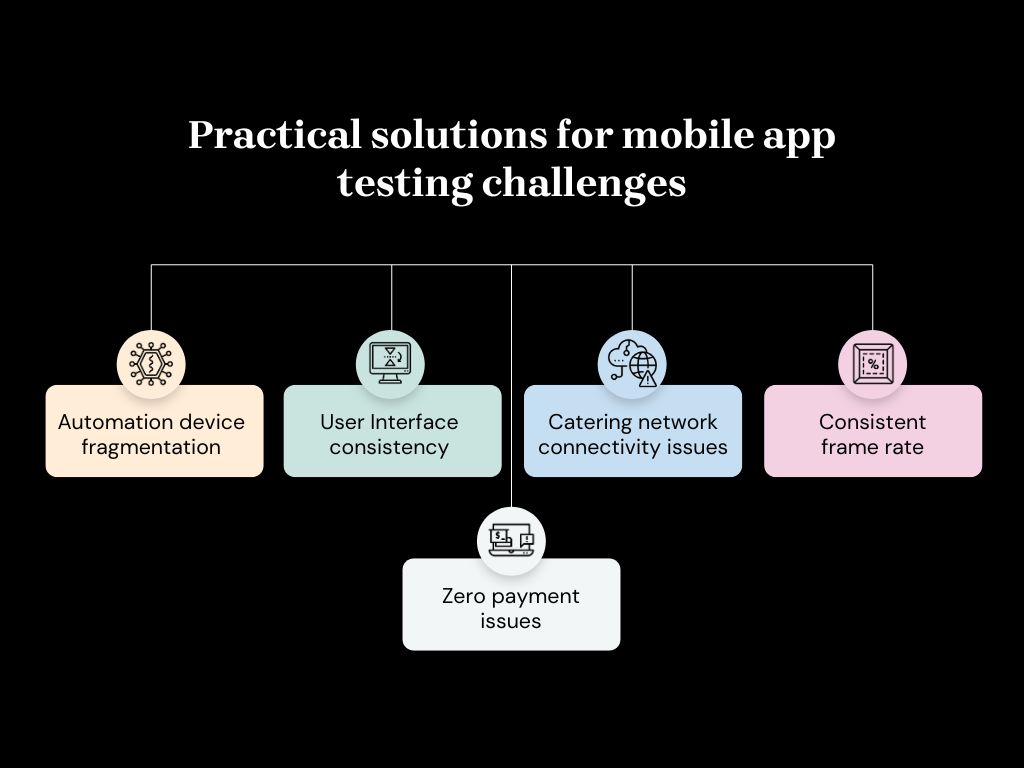
Embrace test automation frameworks like Appium to automate services across multiple devices and operating systems. This framework will allow testers to create and execute test scripts efficiently, covering a wide range of device configurations.
Guide steps:
Here’s a simple example of running the tests on multiple devices over BrowserStack using Appium:
import org.testng.annotations.AfterMethod;
import org.testng.annotations.BeforeMethod;
import org.testng.annotations.DataProvider;
import org.testng.annotations.Test;
import org.openqa.selenium.remote.DesiredCapabilities;
import io.appium.java_client.AppiumDriver;
import io.appium.java_client.MobileElement;

public class BrowserStackAppiumTest {
    public AppiumDriver<MobileElement> driver;

    @DataProvider(name="deviceData")
    public Object[][] deviceData() {
        return new Object[][] {
            { "Samsung Galaxy S8", "7.0" },
            { "iPhone XS", "12" }
            // Add as many devices as you want here
        };
    }

    @BeforeMethod(alwaysRun=true)
    public void setUp(String device, String os_version) throws Exception {
        // Set your BrowserStack access credentials
        String USERNAME = "your_browserstack_username";
        String ACCESS_KEY = "your_browserstack_access_key";

        // Define the BrowserStack URL
        String URL = "http://" + USERNAME + ":" + ACCESS_KEY + "@hub-cloud.browserstack.com/wd/hub";

        // Define capabilities for the device
        DesiredCapabilities capabilities = new DesiredCapabilities();
        capabilities.setCapability("device", device);
        capabilities.setCapability("os_version", os_version);
        capabilities.setCapability("app", "bs://<app-id>");
        // Add more capabilities as needed

        // Initialize the Appium driver for BrowserStack
        driver = new AppiumDriver<MobileElement>(new java.net.URL(URL), capabilities);
    }

    @Test(dataProvider="deviceData")
    public void testAppOnMultipleDevices(String device, String os_version) {
        // Your test code goes here. For example, navigating through the app's submenu
    }

    @AfterMethod(alwaysRun=true)
    public void tearDown() {
        if (driver != null) {
            driver.quit();
        }
    }
}A responsive design strategy is essential for ensuring a consistent and engaging user interface across various devices. This involves creating a flexible layout that adapts to different screen sizes and resolutions while ensuring that all UI components are correctly scaled and positioned.
The objective is to maintain visual appeal and functionality while providing an optimal experience for all users, regardless of the device they are using.
As a tester, you should:
Here’s how you can use Appium with Applitools Eyes for visual testing:
import io.appium.java_client.MobileElement;
import io.appium.java_client.android.AndroidDriver;
import com.applitools.eyes.RectangleSize;
import com.applitools.eyes.selenium.Eyes;
import org.openqa.selenium.remote.DesiredCapabilities;
import java.net.URL;

public class MobileAppVisualTest {

    public static void main(String[] args) throws Exception {
        // Initialize the Appium driver
        DesiredCapabilities capabilities = new DesiredCapabilities();
        capabilities.setCapability("deviceName", "Your Device Name");
        capabilities.setCapability("platformName", "Android");
        capabilities.setCapability("app", "path/to/your/app.apk");
        AndroidDriver<MobileElement> driver = new AndroidDriver<>(new URL("http://localhost:4723/wd/hub"), capabilities);

        // Initialize Applitools Eyes for visual validation
        Eyes eyes = new Eyes();
        eyes.setApiKey("Your Applitools API Key");

        try {
            // Start visual testing with Applitools Eyes
            eyes.open(driver, "Mobile App", "Visual Test", new RectangleSize(800, 600));

            // Your test code goes here. For example, navigating through the app's menu
            // ...

            // Visual validation point
            eyes.checkWindow("App Main Screen");

            // End the visual test
            eyes.close();
        } finally {
            // Close the Appium driver
            driver.quit();

            // If the test was aborted before eyes.close was called, the test ends as aborted.
            eyes.abortIfNotClosed();
        }
    }
}Network connectivity issues are a critical aspect of mobile automation application testing, especially for modern apps that mostly rely on online features, such as social media platforms, video streaming services, or cloud-based storage solutions. Having a steady and responsive network connection is crucial for providing a flawless user experience, regardless of the app’s particular features.
Testing in a variety of network situations is critical to ensuring that the app stays responsive and reliable, delivering a fair and entertaining experience for all users, regardless of internet connection quality.
Here’s a step-by-step instruction for using Wireshark to examine various sorts of network connections:
By systematically applying the testing solutions, you can enhance the app’s performance, providing a smoother and more enjoyable experience for the users. Performance profiling, performance testing, and tuning the device as per different requirements are necessary to avoid the risk of impact for this challenge.
Practical Steps to Address Frame Rate Drops:
Tackling payment failures in mobile apps involves a combination of technical checks, user interface clarity, and support mechanisms to address any issues that arise during the payment process. By doing so, you can maintain a smooth and reliable payment experience for users.To effectively handle payment failures in mobile apps, implement the following solutions:
In summary, we’ve explored the various challenges faced in testing mobile apps and provided practical solutions to address them effectively. Each difficulty provides various challenges that might have an influence on an app’s success, ranging from device fragmentation to uneven user interfaces.
The mobile app market is growing and shows no signs of slowing down as technology progresses. The environment is always changing due to the rise of cloud-based services, augmented reality (AR), and virtual reality (VR). This presents both new challenges and possibilities for developers and testers.
Quality assurance will play a significant role in influencing the future of mobile apps by ensuring that apps fulfill users’ increasingly high standards for functionality, design, and user experience. By combining AI-driven testing tools and frameworks, testers can do almost anything. If you are looking for a reliable and experienced software testing service provider, feel free to reach out to Alphabin.

QA Engineer
Naman Upadhyay, a proficient QA Engineer at Alphabin, excels in Python and React, proficiently managing diverse projects. Known for his precision-driven approach, he delivers high-quality software solutions.
ByPratik Patel
Sep 16, 2025
Modern, scalable Playwright boosts reliability and CI velocity for enterprises in 2025, see how it outperforms legacy stacks.

ByPratik Patel
Jul 12, 2025
Learn how to select the best test automation service with our 10-point evaluation framework. Ensure high-quality, efficient testing for your projects.

ByPratik Patel
Apr 22, 2025
TestGenX is an AI-native test automation tool designed to help QA teams automate testing at the speed of modern development. With no-code test creation, AI-driven maintenance, and parallel execution, it ensures fast, reliable tests for AI-powered applications.