


Mobile App Testing Crash Rates: 2025 Stats & Trends
ByPratik Patel
Sep 20, 2025
Explore 2025 statistics on mobile app testing crash rates. Learn industry benchmarks and see how crashes impact user retention.

Join us on a captivating journey as we unravel the secrets behind crafting flawless user experiences on mobile platforms through strict mobile app testing. In this blog, we will explore the tools, challenges, and techniques associated with testing a seamless user experience on mobile platforms.
Mobile usability testing is a systematic process of evaluating how easy and intuitive it is for users to interact with an application in mobile app development. It involves observing real users as they complete specific tasks within the app.
This allows you to confirm, through screen recordings and user behavior analysis, how effectively they complete tasks on real mobile devices.
Importance of mobile usability testing
Conducting mobile app usability testing is crucial for several reasons.
Despite the availability of tools and techniques on the market, mobile usability testing is not without its challenges. Let’s discuss some of these challenges and what impact they have.
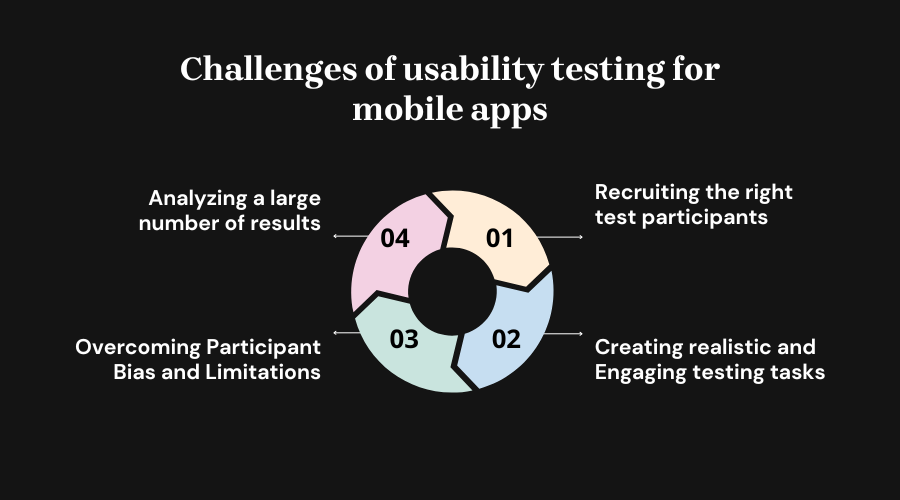
Finding participants who accurately represent your user base can be challenging. The quality of usability testing results heavily depends on the relevance of the participants.
How to tackle this challenge?
There are two solutions to this challenge:
The tasks given to participants during testing should reflect real-world use cases. Creating tasks that are both realistic and engaging can be difficult.
How to tackle this challenge?
Understand your users’ goals and create tasks that mirror these goals. Make sure tasks are clear, concise, and directly related to the key functionalities of your mobile application or website.
Stability testing can generate a large amount of data. Analyzing this data and interpreting it in a way that leads to actionable insights can be challenging.
How to tackle this challenge?
Use a structured approach to analyze the data. Look for patterns in user behavior, take note of any difficulties or frustrations, and identify areas for improvement.
Participants may alter their behavior because they know they’re being observed (Hawthorne Effect), or they may give overly positive feedback to please the tester (Social Desirability Bias). These biases can skew the test results.
How to tackle this challenge?
Consider using unmoderated tests to reduce the Hawthorne effect. To ensure participants behave as they normally would and that all feedback, positive or negative, is valuable.
In the face of unique challenges in mobile usability testing, certain techniques stand out for their effectiveness. Let’s delve into these methods.
This technique involves random people (e.g., those passing by in a hallway) testing your mobile application or website, giving an instantaneous response on something they like or suggestions on areas for improvement.
Steps:
This mobile testing technique involves users usability testing the mobile application remotely while the tester observes and records the session. It allows for a larger and more diverse pool of testers, leading to more comprehensive insights.
Refer to one of our engagement models, QA Staff Augmentation, where you can scale up and down test resources.
Steps:
This technique involves a moderator guiding the user through the test in real time. Moderated usability testing allows for immediate feedback and clarification of user actions and thoughts.
Steps:
The Gestalt principles evaluation technique is one of the primary usability testing techniques involves assessing the design of a mobile application, including mobile banking app testing, based on Gestalt principles such as proximity, similarity, and closure. By applying these principles, you can enhance user perception and understanding of the app’s layout.
Steps:
This technique involves comparing two versions of a page or feature to see which performs better. A/B testing can provide quantitative data on the effectiveness of different design elements.
Steps:
This technique can provide more natural user feedback as users interact with the application without any guidance. This can lead to more authentic insights into the mobile user experience.
Steps:
In conclusion, while mobile usability testing presents unique challenges, the insights it offers are invaluable for crafting user-centric and successful mobile applications.
By embracing a variety of mobile app usability testing methods, from quick-and-easy hallway testing to the in-depth analysis of usability testing, you can gain a comprehensive understanding of how users interact with your app.
Remember, the key lies in acknowledging these challenges, not shying away from them. If you have any queries regarding usability testing or mobile testing in general, reach out to us at the leading software testing company’s official site.

QA Engineer
Naman Upadhyay, a proficient QA Engineer at Alphabin, excels in Python and React, proficiently managing diverse projects. Known for his precision-driven approach, he delivers high-quality software solutions.
ByPratik Patel
Sep 20, 2025
Explore 2025 statistics on mobile app testing crash rates. Learn industry benchmarks and see how crashes impact user retention.

ByPratik Patel
Sep 20, 2025
Review battery drain issues in mobile app testing. See 2025 statistics and learn how power use impacts retention and reviews.

ByPratik Patel
Sep 20, 2025
Discover uninstall rates in mobile app testing with 2025 data. Understand why apps get removed and how QA teams can respond.