


HealthTech QA Services
ByPratik Patel
Mar 31, 2026
HealthTech QA Services ensure healthcare software is safe, compliant, and accurate. Explore AI testing, LLM evaluation, security, and compliance testing strategies for healthcare applications.

Here’s what I’ve learned after working with hundreds of QA teams: the bugs that hurt most aren’t the obvious ones.
They’re the edge cases we once deemed “unlikely.” When it comes to test coverage, these overlooked scenarios often become your biggest headaches.
I see it constantly: teams with impressive coverage metrics still miss critical scenarios. Like when a major retailer’s checkout system failed because nobody tested what happens when a discount code expires mid-transaction during Black Friday!
Sound familiar?
Here’s the thing – your test coverage percentage is meaningless if you’re not testing the right scenarios. I learned this when a ‘fully tested’ checkout flow crashed because no one checked what would happen if inventory ran out mid-purchase!
Let me share something counterintuitive: having 100% code coverage doesn’t mean your app won’t fail spectacularly.
I learned this the hard way when our “fully covered” e-commerce platform crashed because nobody tested what happens when a user applies a coupon code while their session expires. The code was covered. The scenario wasn’t.
This is why we need to discuss test coverage strategies differently within the Playwright framework, not as a metric to maximize, but as a strategic tool to minimize business risk.
Here’s a distinction that took me years to fully appreciate:
To measure code coverage in Playwright, you can use built-in tools or plugins that generate coverage reports, helping you assess which parts of your codebase are exercised during testing.
Think about it like this: you can execute every line of your payment processing code (100% code coverage), but still miss testing what happens when a customer’s card gets declined after inventory is already reserved. See the gap?
In e-commerce, this gap can cost you thousands per minute during peak hours.
| Practice | What to Do | Why It Works | Playwright Code |
|---|---|---|---|
| Test What Matters | Focus on features that make you money. | Broken login = no revenue. Broken footer link = who cares? | test('User can buy stuff', { tag: '@critical' }) |
| Automate the Boring Stuff | If you’re doing it manually more than 3 times, automate it. | Humans are terrible at repetitive tasks. | test.each(testData) for data-driven tests. |
| Test Real Scenarios | Use actual browsers, real data, real user flows. | Simulators lie. Real environments tell the truth. | { projects: [{ name: 'chromium' }, { name: 'firefox' }] } |
| Quality > Quantity | 10 solid tests beat 100 flaky ones. | Flaky tests are worse than no tests. | Write tests that actually fail when things break. |
| Set Realistic Goals | Aim for 80% coverage, not 100%. | Perfect is the enemy of good. | Track coverage in CI, set achievable thresholds. |
| Cover Edge Cases | Test the weird stuff users will definitely try. | Users will find ways to break your app you never imagined. | Test empty inputs, max values, special characters. |
| Review and Improve | Look at your coverage reports monthly. | Data doesn’t lie about what you’re missing. | Generate HTML reports, find gaps, fix them. |
| Test Across Browsers | Your app needs to work everywhere. | “Works on my machine” is not a strategy. | Parallel browser testing with Playwright. |
Not all features deserve equal attention. This seems obvious, yet I see teams spending equal time testing their “About Us” page and their checkout flow.
Here’s how to think about risk in practical terms:
High Risk = High Impact × High Likelihood
For any e-commerce site, your high-risk areas typically include :
Low-risk areas? Holiday banner rotation and footer link updates.
The TestRail team puts it perfectly:
“Focusing on high-risk areas achieves comprehensive test coverage efficiently with limited resources.”
During peak sales, allocate 80% of your Playwright tests to checkout, payment, and cart flows. Everything else can wait.
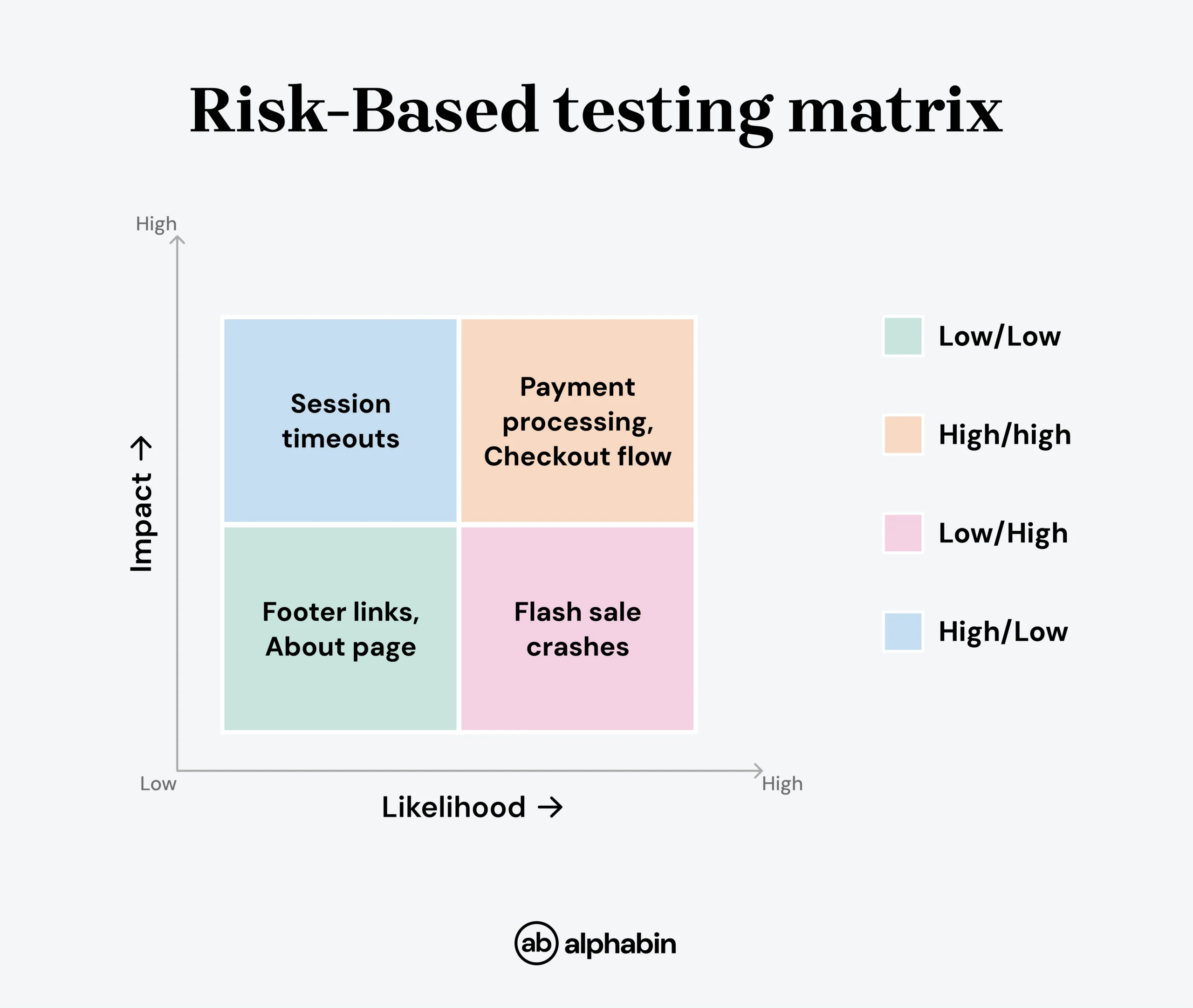
Track your risk coverage with a simple metric: the percentage of identified risks covered by tests. If a payment integration is high-risk, it should undergo multiple end-to-end tests that cover both happy paths and edge cases.
But here’s what most guides won’t tell you: risk changes. That feature that was low-risk last month? This might be critical during your flash sale. Keep reassessing.
Let’s get practical. Here’s what kills most test suites: repetition and brittleness.
Before you start, you need to import or require ‘test’ and ‘expect’ from the Playwright testing package. This is often referred to as ‘require test’.
Here’s how parameterized testing dramatically improves your test coverage without writing tons of separate tests:
1. Single Test, Multiple Scenarios:
Instead of writing 5 separate login tests, cover all scenarios with one parameterized test:
const loginScenarios = [
{ email: 'valid@test.com', password: 'correct123', expected: 'success' },
{ email: 'invalid@test.com', password: 'wrong', expected: 'error' },
{ email: '', password: 'test123', expected: 'validation' },
{ email: 'test@test.com', password: '', expected: 'validation' },
{ email: 'admin@test.com', password: 'admin123', expected: 'admin_dashboard' }
];
loginScenarios.forEach(({ email, password, expected }) => {
test(`Login coverage: ${expected} scenario`, async ({ page }) => {
await page.goto('/login');
await page.fill('#email', email);
await page.fill('#password', password);
await page.click('#login-btn');
// Different assertions based on expected outcome
if (expected === 'success') {
await expect(page.locator('.dashboard')).toBeVisible();
} else if (expected === 'error') {
await expect(page.locator('.error-message')).toBeVisible();
}
});
});2. Coverage Benefits:

3. Result: 5x better test coverage with the same maintenance effort. Your coverage report will show comprehensive scenario testing instead of gaps where edge cases weren’t considered.
4. The key insight? Parameters don’t just save time; they force you to think about ALL the scenarios your users might encounter, leading to more thorough test coverage.
Effective, scalable coverage begins with identifying which tests to automate using specific guidelines and an Automation Feasibility Analysis.
Technology-facing tests that guide development are almost always excellent candidates for automation, while business-facing tests may require more selective automation approaches.
Consider these criteria when building your scalable coverage strategy:
The usage of data-driven testing in Playwright allows you to efficiently execute the same test logic with multiple data sets, streamlining your test coverage and reducing code duplication.
Let’s be honest: nobody wants to write (or maintain) the same test over and over just to check different data. That’s where data-driven testing becomes your best friend.
Here’s the magic:
With Playwright, you can run the same test logic against a bunch of different data sets. One test, many scenarios, maximum coverage, minimal code.
1. How It Works:
2. Result:
You can cover tons of scenarios (valid, invalid, edge cases, etc.) just by updating your data file; no need to touch your test code.
3. Example:
[
  { "username": "user1", "password": "pass1", "expectedResult": "success" },
  { "username": "user2", "password": "wrongpass", "expectedResult": "failure" },
  { "username": "user3", "password": "", "expectedResult": "validation" }
]import { test, expect } from '@playwright/test';
import testData from './loginTestData.json';
test.describe('Login - Data Driven', () => {
testData.forEach(({ username, password, expectedResult }) => {
test(`Login as "${username}" expecting "${expectedResult}"`, async ({ page }) => {
await page.goto('https://yourapp.com/login');
await page.fill('#username', username);
await page.fill('#password', password);
await page.click('#login-btn');
if (expectedResult === 'success') {
await expect(page.locator('.dashboard')).toBeVisible();
} else if (expectedResult === 'failure') {
await expect(page.locator('.error-message')).toBeVisible();
} else if (expectedResult === 'validation') {
await expect(page.locator('.validation-message')).toBeVisible();
}
});
});
});
For true data-driven testing, move your data to an external file. This makes your tests easier to maintain and scale; just add new data to the file, no code changes needed!
Here’s something powerful: Playwright can run the same test across Chromium, Firefox, and WebKit without extra code. Playwright offers support for running tests across multiple browsers, making it easy to ensure broad compatibility
One test, 3 browsers. That’s automatic coverage multiplication.
But should you always test everything everywhere? Not always.
Start with your analytics. If 70% of your users are on Chrome mobile, focus your deep testing there. For other browsers, cover the critical flows like login, checkout, or signup.
Want to seriously boost your test coverage? Don’t just run tests on your local machine or a single environment. Make your tests work for you by running them across QA, staging, and production (yes, even production!).
1. Why Multiple Environments Matter
| Environment | Purpose | What to Run | Key Notes |
|---|---|---|---|
| QA | Your playground for testing and experimentation. | All tests: regression, edge cases, exploratory, destructive. | Break things, fix them, repeat. Ideal for early bug catching. |
| Staging | Mirrors production; final checkpoint before release. | Full test suite: regression, integration, end-to-end. | Catch config/integration issues. Should closely match production setup. |
| Production | Live environment for real users. | Critical smoke tests only. | Never run destructive tests. Focus on main flows and uptime. |
2. How This Multiplies Coverage
Testing in just one environment is like checking your parachute in the garage, but never before the jump. By running your tests across QA, stage, and prod, you:
3. Practical Tips
4. Playwright Config for Multiple Environments
// playwright.config.js
const baseUrls = {
qa: 'https://qa.yoursite.com',
stage: 'https://stage.yoursite.com',
prod: 'https://yoursite.com'
};
module.exports = {
projects: [
{ name: 'QA', use: { baseURL: baseUrls.qa } },
{ name: 'Staging', use: { baseURL: baseUrls.stage } },
{ name: 'Production', use: { baseURL: baseUrls.prod } }
]
};- name: Run Playwright tests
run: npx playwright test --workers=2But here’s the secret: sharding. Split your test suite across multiple CI jobs:
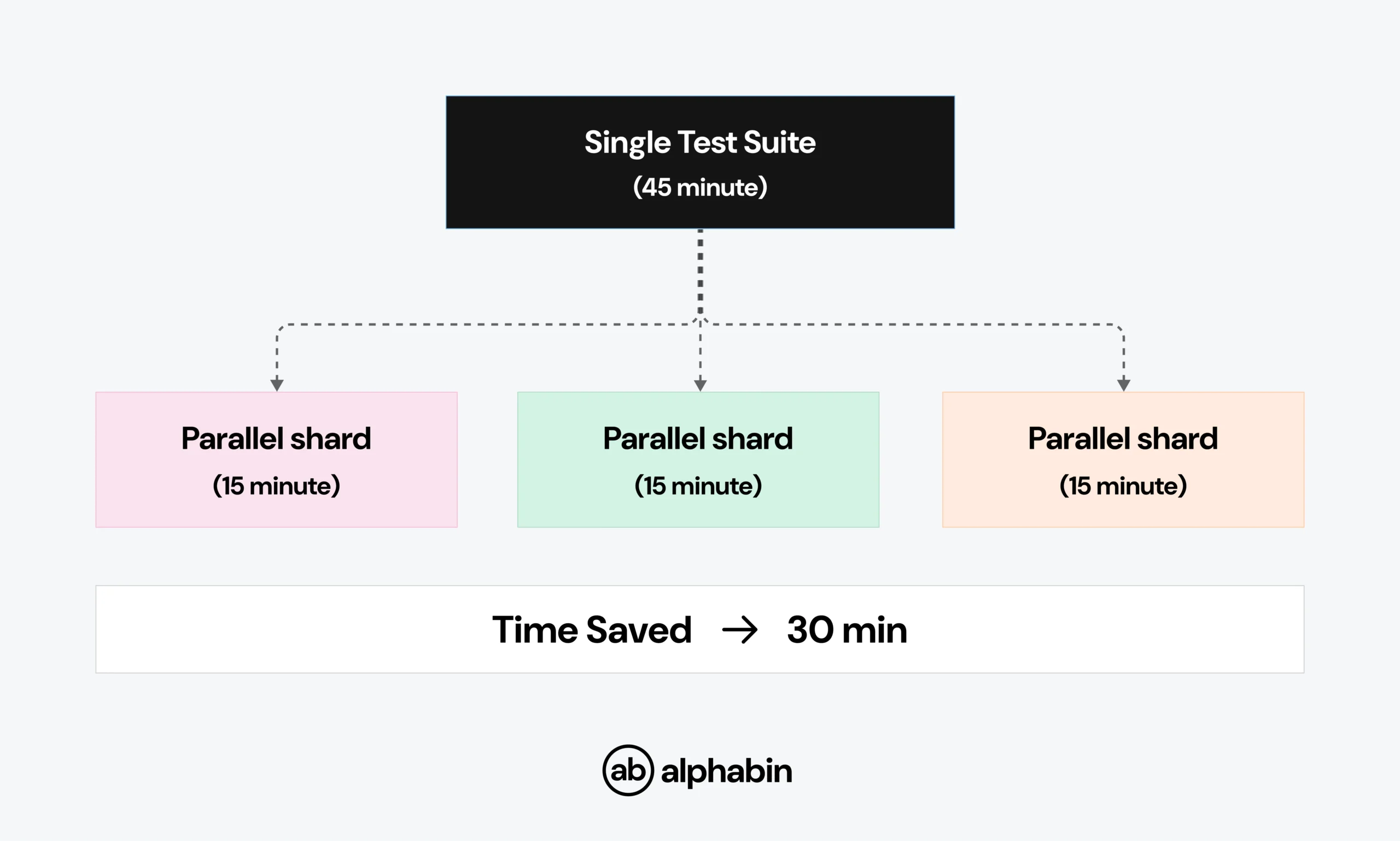
We cut our CI time from 45 minutes to 15 minutes with this approach. That’s 30 minutes faster feedback on every commit.
Large test suites can bog down development. Use –only-changed to run only tests affected by recent changes during development. Save the full suite of pre-merge checks.
This isn’t cutting corners, it’s being strategic about feedback loops.
Perfect test coverage is a myth. Strategic test coverage is achievable.
Focus on what breaks your business, not what breaks your metrics. Use Playwright’s power: parallel execution, cross-browser testing, and AI integration to cover more ground with less effort.
Remember: the goal isn’t to test everything. It’s to sleep soundly knowing the important things won’t break.
What’s the one user flow you’re losing sleep over? Start there. The rest will follow.
Because in the end, test coverage isn’t about the tests you write. It’s about the failures you prevent.

Founder and CEO
Pratik Patel is the founder and CEO of Alphabin, an AI-powered Software Testing company. He has over 10 years of experience in building automation testing teams and leading complex projects, and has worked with startups and Fortune 500 companies to improve QA processes. At Alphabin, Pratik leads a team that uses AI to revolutionize testing in various industries, including Healthcare, PropTech, E-commerce, Fintech, and Blockchain.
ByPratik Patel
Mar 31, 2026
HealthTech QA Services ensure healthcare software is safe, compliant, and accurate. Explore AI testing, LLM evaluation, security, and compliance testing strategies for healthcare applications.

ByPratik Patel
Mar 10, 2026
Discover how AI test automation and manual testing work together to enhance quality assurance. Learn strategies, tools, and best practices for modern software testing

ByPratik Patel
Mar 5, 2026
Automation testing and AI engineering roadmap for QA professionals. Learn Playwright, Selenium, CI/CD, and AI skills to grow your tech career.